
'/%3E%3Cpath%20fill='%23b2b2b2'%20d='M241%20382q0%2016%2017%2026%2017%2011%2042%2011t42-11q16-11%2017-26V269H241'/%3E%3Cpath%20fill='%239f7e00'%20d='M241%20379q0%2014%208%2023%209%209%2021%209%2014%200%2021-9%209-9%209-23V269h-59'/%3E%3Cpath%20d='M241%20339v-70h59v110q0%2014-9%2023l-6%205v-68h-15v72q-8%200-14-4v-68zm59%2040c0%2022%2015%2032%2029%2032%2021%200%2030-18%2030-32v-40h-59'/%3E%3Cpath%20fill='%239f7e00'%20d='M266%20277v5h2v12h-3v-5h2v-5h-9v5h2v5h-4v9h3v18h-5v10h34v-10h-5v-18h3v-9h-4v-5h2v-5h-9v5h2v5h-3v-12h2v-5zm42%20101q0%2010%206%2017%206%206%2015%207%2010-1%2016-7%206-7%206-17v-29h-43'/%3E%3Ccircle%20fill='%230044ad'%20cx='329.5'%20cy='372'%20r='6'/%3E%3Cellipse%20fill='%230044ad'%20cx='300'%20cy='340'%20rx='16'%20ry='21'/%3E%3C/svg%3E)

If you’re a designer, photographer or just someone who wants to set a nice image as background on your computer but you have no idea about which size to use, then this is an article for you
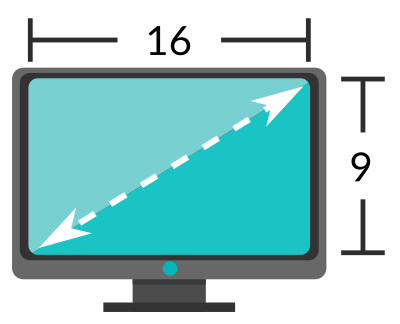
There is a wide variety of screens available, so finding the best size for your screen might turn into a headache, however, once you understand how the aspect ratio works with your resolution it will be a piece of cake. Lets talk about 2 aspect ratio mainly 16:9 and 4:3
This is the standard for HD tvs and has become into a wide used dimension. It’s wide and it’s usually called panoramic or widescreen.
- 960×540 px
- 1024×576 px
- 1280×720 px
- 1366×768 px
- 1600×900 px
- 1920×1080 px
- 2048×1152 px
Until 2009 it was the standard for PAL tv; many computers and tv used this standard. It’s usually called squared or wide.
- 800×600 px
- 1024×768 px
- 1152×864 px
- 1280×960 px
- 1400×1050 px
- 1440×1080 px
- 1600×1200 px
- 1680×1260 px
- 1920×1440 px
- 2048×1536 px
There are many aspect ratio and sizes, however, the previous list only shows a couple of the most used. Lets list a bit more of sizes for the aspect ratio 5:4, 16:10, 5:3 y 3:2
- 1280×1024 px
- 960×600 px
- 1152×720 px
- 1280×800 px
- 1440×900 px
- 1680×1050 px
- 1920×1200 px
- 800×480 px
- 1280×768 px
- 1152×768 px
- 1440×960 px
- 2000×1333 px
muchas gracias es justo lo que recitaba muy bien explicado
Gracias por la clase, muy útil para seleccionar el formato de un fondo de escritorio
me salvaron la vida son increibles
Una buena opción es buscar fondos de pantallas en calidad superior a 2048x1536px, así podrás recortarlo a la medida que puedas necesitarlo.
Tanto en la laptop o móvil puedes ponerlo como fondo de pantalla y seleccionar el modo de recorte que más te guste para que se visualice mejor.
Muchas Gracias por la información Todo muy correcto y bien explicado (y)
[…] Medidas estándar para fondos de pantalla (wallpapers) […]